LED face masks have rapidly emerged as a staple in skincare routines worldwide, offering innovative solutions for improving skin tone, reducing fine lines, and addressing acne issues—all from the comfort of your home. With proper care and maintenance, your LED face mask can deliver optimal performance and longevity for years. This comprehensive guide provides step-by-step cleaning techniques, routine maintenance tips, and troubleshooting advice to ensure your mask stays in peak condition while helping your skin glow.
Quick Links:
- Understanding Your LED Face Mask
- Why Proper Cleaning and Maintenance Matter
- Essential Cleaning Techniques
- Routine Maintenance for Longevity
- Troubleshooting Common Issues
- Expert Tips and Additional Considerations
- Conclusion
Understanding Your LED Face Mask
LED face masks utilize light-emitting diodes to deliver wavelengths of light that stimulate collagen production, reduce inflammation, and promote skin repair. Different wavelengths (e.g., red for anti-aging, blue for acne treatment) target specific skin concerns, making these devices a versatile tool in your beauty arsenal.
Key Features:
- Advanced Light Therapy: Multiple wavelengths for targeted skincare.
- User-Friendly Design: Adjustable settings and comfortable fit.
- Technological Precision: Often equipped with sensors and timers for safe usage.
Understanding these features is vital—not only for effective treatment but also for ensuring that cleaning and maintenance routines do not interfere with the sensitive electronic components of your device.
Why Proper Cleaning and Maintenance Matter
Proper cleaning and maintenance extend the life of your LED face mask and safeguard your skin from potential irritation or infection caused by buildup of oils, makeup residue, or bacteria. A well-maintained mask also ensures consistent performance, reduces downtime due to technical issues, and ultimately protects your investment.
Benefits include:
- Enhanced Device Performance: Clean optics and circuitry ensure consistent light output.
- Skin Safety: Reduces the risk of acne flare-ups or skin irritations.
- Longevity: Routine care prevents premature wear and tear on sensitive components.
- Cost Efficiency: Minimizes the need for expensive repairs or replacements.
Essential Cleaning Techniques
Cleaning your LED face mask properly is a blend of art and science. It requires attention to detail, adherence to manufacturer guidelines, and the right materials. Here’s how you can do it effectively:
Materials Needed
- Soft, Lint-Free Microfiber Cloth: Ideal for removing smudges and fingerprints.
- Mild, Non-Irritating Cleanser: A gentle soap or cleanser designed for electronics.
- Isopropyl Alcohol (70% or less): Use this to disinfect surfaces (ensure it's safe for your device).
- Distilled Water: To mix with the cleanser if needed.
- Cotton Swabs: For cleaning small crevices or hard-to-reach areas.
- Drying Towel or Air Drying Space: Allow the mask to completely dry before use.
| Tip: Always consult your device’s user manual for any specific cleaning agents or materials the manufacturer recommends. |
Step-by-Step Cleaning Process
- Power Off and Unplug: Before cleaning, ensure your LED face mask is turned off, unplugged, and ideally disconnected from any charging station to avoid electrical damage.
- Remove Removable Parts: If your mask has detachable accessories (such as face pads or LED panels), gently remove them and clean separately.
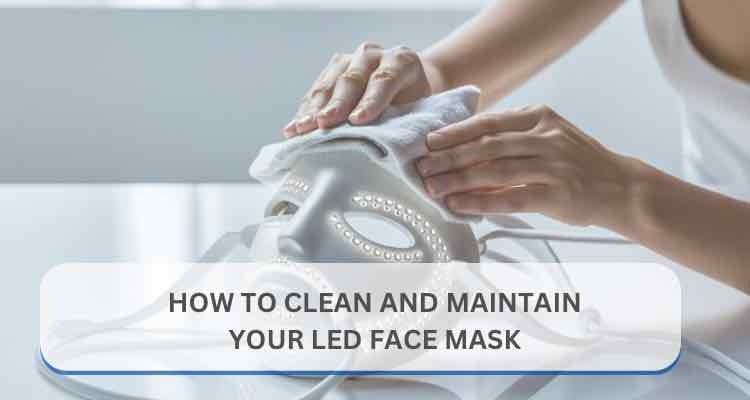
- Dust Off with a Microfiber Cloth: Lightly wipe down the exterior with a dry microfiber cloth to remove loose dust and debris.
- Prepare a Cleaning Solution: Mix a few drops of mild cleanser with distilled water. Alternatively, dampen the microfiber cloth with a diluted solution.
- Wipe Down Surfaces: Gently clean all surfaces, taking care around LED panels and electronic components. Avoid soaking any parts.
- Detail Cleaning: Gently clean around buttons, seams, and connectors with a cotton swab dipped in isopropyl alcohol.
- Rinse (If Necessary): For parts that can be safely rinsed, use distilled water. Make sure no liquid seeps into the electronic components.
- Dry Thoroughly: Pat dry with a clean towel and let the mask air dry in a well-ventilated area before reassembling or using it.
- Reassemble and Store: Reattach any removable parts once completely dry and store your mask in a clean, dry place.
| Safety Note: Never immerse the entire device in water. Excess moisture can damage internal circuitry and void warranties. |
Routine Maintenance for Longevity
Regular maintenance is as critical as proper cleaning. Here are some routine practices to keep your LED face mask performing at its best:
Daily and Weekly Practices
- Daily Wipe-Down: After each use, lightly wipe the mask with a dry microfiber cloth to remove surface oils and makeup residues.
- Weekly Deep Clean: Once a week, perform a more thorough cleaning following the steps above to remove buildup that can affect light transmission and hygiene.
- Monitor Usage Hours: Some devices have built-in timers. Tracking usage can help you adhere to manufacturer recommendations, ensuring optimal performance without overuse.
- Firmware and App Updates: If your mask is equipped with smart features, regularly update its firmware or companion app to take advantage of the latest performance and security improvements.
Proper Storage Tips
- Cool and Dry Environment: Store your mask in a location free from humidity and extreme temperatures.
- Dust-Free Storage Case: Many manufacturers provide or recommend a protective case to shield your device from dust and accidental damage.
- Avoid Direct Sunlight: Extended exposure to sunlight can degrade both the device’s exterior and its internal components.
- Cable Management: Keep any attached cables neatly coiled and away from areas where they could be damaged.
Troubleshooting Common Issues
Even with meticulous care, issues may occasionally arise. Here’s how to troubleshoot common problems with your LED face mask:
LED Light Malfunction
Issue: Some or all LED lights fail to turn on.
Troubleshooting Steps:
- Check the Power Supply: Ensure the mask is properly plugged in or that the battery is charged.
- Inspect the Connection: Look for loose cables or damaged connectors.
- Reset the Device: Turn off the mask, wait a few minutes, and power it back on.
- Consult the Manual: Refer to the troubleshooting section in your user manual for device-specific guidance.
Uneven Light Distribution
Issue: The mask emits uneven light, potentially reducing treatment efficacy.
Troubleshooting Steps:
- Clean the LED Panels: Even minor smudges or dust can obstruct light. Gently wipe the panels with a microfiber cloth.
- Check for Physical Damage: Inspect the mask for any cracks or damage affecting light distribution.
- Calibration Reset: If your mask has calibration settings, perform a reset as instructed by the manufacturer.
Connectivity and App Issues
Issue: Problems connecting to a companion app or syncing data.
Troubleshooting Steps:
- Restart Devices: Power cycle both the mask and the smartphone or tablet.
- Software Update: Check for and install any available updates for the mask’s firmware or companion app.
- Re-Pair the Device: Follow the app’s instructions to disconnect and then re-establish the connection.
- Technical Support: If problems persist, contact the manufacturer's customer support for assistance.
| Pro Tip: Always log any issues, including dates and troubleshooting steps taken. This can be invaluable if you need to claim warranty support or seek professional repair services. |
Expert Tips and Additional Considerations
Avoid Harsh Chemicals
Harsh chemicals, including bleach or ammonia-based cleaners, can degrade the delicate materials and electronics of your LED face mask. Stick to mild, non-abrasive cleaners as recommended by your manufacturer.
Regular Inspections
- Visual Checks: Regularly inspect your mask for signs of wear, tear, or discoloration.
- Operational Tests: Periodically run the device through a complete cycle to ensure all functions are operational.
Educate Yourself
Stay informed about the latest updates and user experiences with your specific LED face mask model. Manufacturers sometimes release new guidelines or updates that could improve performance or extend device longevity.
Eco-Friendly Practices
- Reuse Cleaning Materials: Invest in high-quality, washable microfiber cloths.
- Proper Disposal: If you need to dispose of any components, follow local regulations for electronic waste.
ConclusionMaintaining your LED face mask is not just about keeping it clean—it’s about ensuring that every session you invest in your skin is as effective and safe as possible. By following the detailed cleaning procedures, adhering to routine maintenance tips, and promptly troubleshooting any issues, you can maximize the benefits of your LED therapy while extending your device's lifespan. Remember, your LED face mask is an investment in your skin’s future. With the right care, it will continue to deliver radiant results long into 2026 and beyond. By embracing these best practices, you will preserve the functionality and performance of your LED face mask and contribute to a healthier, more vibrant skincare routine. Happy cleaning and glowing skin! |
Disclaimer
The information provided in this article is intended for general informational purposes only and should not be considered as professional advice. Always refer to your LED face mask’s user manual and follow the manufacturer’s guidelines for cleaning, maintenance, and safe use. We do not assume any responsibility for any errors, omissions, or outcomes arising from the application of the content herein. Use this information at your own risk, and consult with a qualified professional if you have any concerns or require specific advice regarding your device.